shopify / seo / product-titles
Shopify Product Title SEO: Store Title, Search Title, and Shopping Title
Product Title, Search engine listing Page title, and the Shopping feed title are three separate Shopify jobs—editing one field does not finish the other two.
If you run a Shopify store, “product title SEO” is not one box you stuff until Google is happy. You have three title jobs: the storefront Title customers see as the page H1 (and in cart and orders), the Search engine listing → Page title that becomes the blue link in organic results, and the Shopping / feed title Merchant Center uses to match Shopping queries. Editing one field does not finish the other two.
This page is for merchants rewriting titles in admin. It is not a Liquid tutorial and not a shopper product-name browse. Mechanics below follow Shopify Help on adding keywords for SEO and Google’s Merchant Center title attribute.
Three title jobs on Shopify: (1) Product Title — storefront H1, cart, orders, and the default source for the search listing until you override it. (2) Search engine listing → Page title — the organic SERP blue link under Products → Search engine listing; Help recommends about 60 characters (up to 70). (3) Shopping / feed title — Merchant Center
title(up to 150 characters) for Shopping matching and listings; changing only the Search engine listing Page title does not rewrite that feed job. Put color, size, and specs in options or metafields—not piled into the store Title.
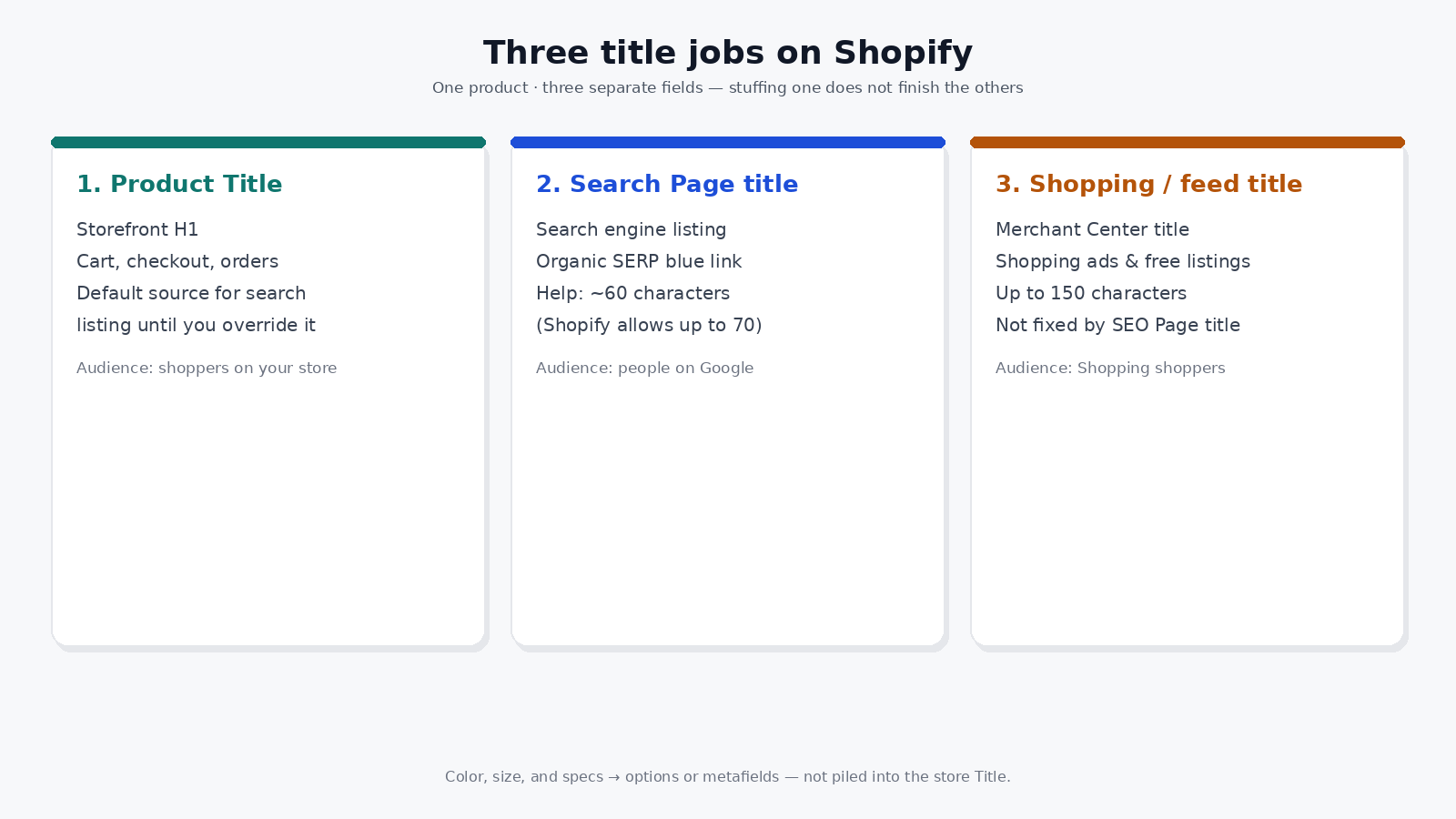
Product Title, Search Page title, and Shopping feed title are three separate fields—editing one does not finish the other two.
The three titles at a glance
| Field | What it does | Who it is for |
|---|---|---|
| Product Title | Becomes the product page H1; shows in cart, checkout, and orders; seeds the Search engine listing until you edit that listing | Shoppers already on your store |
| Search engine listing → Page title | Organic search blue link (title tag); edited separately from the product Title | People choosing a result on Google |
| Shopping / feed title | Merchant Center title used for Shopping ads and free listings |
People comparing offers in Shopping |
Stuffing “brand + type + color + size + material + SEO phrase” into the store Title often hurts the page you already own. It does not automatically fix Shopping matching, and it is not a ranking promise.
Product Title: write for the people on the page
When you create a product, Shopify uses the title you enter to generate the page H1. That same Title is what customers see when the item sits in cart or on an order. Collection and category pages are a different layer: the collection Title is that page’s H1, covered in Shopify collection SEO. Lead with the name a buyer would say out loud. Keep variants and attributes in options (or metafields for specs that are not options)—not as a keyword pile after the name. Size charts, care text, and other shared specs belong in Shopify metafields.
A readable Title still carries your main product words. Help’s SEO guidance is that including main keywords in the title you enter also puts them in the H1. That is for clarity on the page, not a guarantee of a SERP position.
Search engine listing: the organic blue link
Until you customize it, Shopify can default the search listing from the product Title and description. To control what organic results show, open the product and edit Search engine listing:
- In Products, open the product.
- Open Search engine listing (pencil / Edit website SEO, depending on the UI label Help shows).
- Edit Page title and Meta description.
- Save.
Help treats the title tag as one of the most valuable SEO fields you can edit: unique, descriptive, understandable, with important keywords near the beginning. For length: enter a title that is 60 characters or fewer because most search engines shorten longer titles; Shopify allows up to 70 characters and recommends staying near 60. Product listing UI notes that text may cut off above 70 characters for a title (or 320 for a description). Meta description guidance on the same Help topic is about 160 characters.
Google and other search engines can rewrite titles and descriptions from page content and other signals. Your Shopify fields are inputs, not a screenshot of every SERP.
Use Search engine listing when the store Title should stay short for cart and H1, but the organic result needs a clearer clickable line. Do not treat that edit as a Shopping feed rewrite.
Shopping / feed title: a different layer
For Google Shopping and free listings, Merchant Center uses a product title attribute (or structured title). Google’s attribute docs allow up to 150 characters, ask for a specific accurate title that matches the landing-page product, and encourage the details shoppers search—brand, product type, and defining attributes where they belong.
Shopify’s own SEO overview notes that Shopping feed titles should include brand name, product type, and key attributes, and that Google & YouTube can sync your catalog to Merchant Center. That is catalog and ads infrastructure—not a StoreKitly feature, and not the same control as Search engine listing → Page title.
If your feed title is wrong but your organic Page title looks fine, fix the feed layer (Merchant Center, supplemental feed, or your sync app)—do not keep lengthening the storefront Title hoping both jobs improve.
What not to do
- Do not turn the store Title into a Shopping keyword dump. Cart and H1 suffer first.
- Do not assume editing Search engine listing updates Shopping titles. Different systems.
- Do not promise yourself a ranking jump from a longer Title. Help documents fields and length; it does not sell positions.
- Do not leave color, size, material, and care instructions only in a jammed Title. Use options and metafields so the page stays scannable and filters can work later.
- Do not confuse theme Liquid tweaks with the merchant job above. Most stores finish Title + Search engine listing in admin before touching code.
A short rewrite pass
- Write a human Product Title (H1 / cart).
- Open Search engine listing and set a Page title ≤ ~60 characters aimed at the organic click—only if the default from Title is weak.
- Check how the same product appears in Shopping / Merchant Center title; adjust the feed path if matching needs brand + type + attributes up front.
- Move leftover attributes out of the Title into options or metafields.
- Recheck one product on the storefront, in an organic result preview, and in the feed—not one screenshot for all three.
FAQ
Is the Shopify product Title the same as the SEO title tag?
Related, not identical. The product Title becomes the H1 and often seeds the Search engine listing. The Page title under Search engine listing is the organic title tag you can set separately.
Will a longer product Title rank higher?
No trustworthy Help page promises that. Longer Titles truncated in SERPs or stuffed for Shopping often make the storefront worse without a guaranteed ranking gain.
Does editing Search engine listing fix Google Shopping titles?
No. Shopping uses the Merchant Center title attribute (and your feed sync). Search engine listing controls the organic listing fields in Shopify.
Where should color and size go?
In product options when shoppers choose them, or in metafields for structured specs—not stacked into the store Title so every channel inherits a mess.